


click to scroll images
W9 1099 Tool
Google Sheet
$49.00
Keeping track of who needs a 1099-NEC or 1099-MISC (and for how much) can be a headache. This automated tool does the heavy lifting for you—calculating thresholds, tracking W-9 statuses, and organizing your payment data into a clean, ready-to-use format for tax filing. This tool is fully customizable so you can update your settings as IRS rules evolve.
This tool enables efficiency and does NOT replace professional tax advice! Walk through your settings and calculations with your tax professional to make sure it works for your specific needs.
What You Will Receive
One PDF download containing the secure link to your private Google Sheets template. Your purchase is for a ready-made digital spreadsheet tool that you use independently, not a service performed on your behalf. No consulting, custom work, or ongoing service is included.
Capabilities
Tax Settings (2026 Ready): Pre-configured with 2026 IRS rules and thresholds for NEC and MISC forms. Includes direct IRS links for easy reference. You can manually adjust these settings if tax laws change or to fit your specific business needs.
Vendor Manager: Your central hub for vendor details. Log addresses and Tax IDs, and use the built-in tracking to see exactly which vendors still owe you a W-9 at a glance.
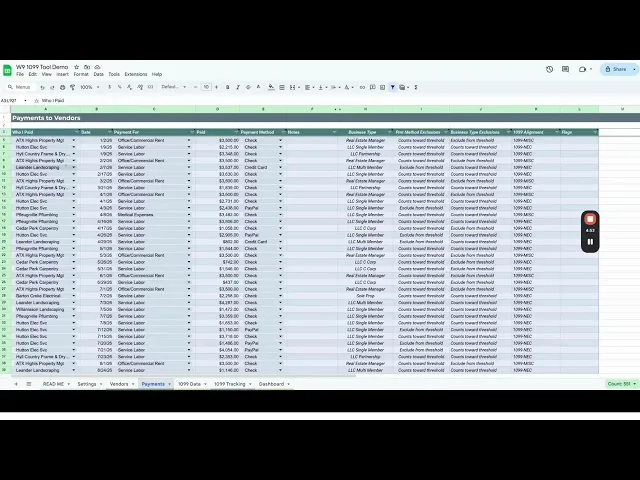
Payments: Simply log your expenses here. The sheet automatically identifies which payments are reportable and sums them up against IRS thresholds based on payment method and business type.
Data for 1099s: No more digging through bank statements! This sheet pulls everything together, showing you exactly what to put in each box for every vendor.
1099s Sent: Keep an audit trail. Log when you’ve submitted forms to the IRS and the vendor, which then updates the status in your Vendor Manager.
Visual Dashboard: Get a bird's-eye view of your spending. View monthly payment trends, identify your top vendors, and see a breakdown of payment methods through clean, professional charts.
FAQ
Q: Do I need a paid Google account?
A: No. A free personal Gmail/Google account is all you need.
Q: Is my data safe?
A: 100%. This is a private template that lives in your secure Google Drive. I never have access to your file or your data.
Q: Can I use this on my phone?
A: Yes, via the free Google Sheets app. However, Google limits certain dropdown and slicer functionality on mobile; for the best comparison experience, I recommend using the desktop version.
Returns
Els Paxton creates digital products designed to save time and solve real problems. Because these products are delivered immediately after purchase, returns aren't available once a file has been downloaded.
If something isn't right, Els Paxton will make every reasonable effort to fix the issue. Please get in touch if:
The wrong product was delivered.
A file is missing, corrupted, or won't open.
A technical issue prevents the product from working as intended.
When possible, Els Paxton will provide replacement files, updates, or troubleshooting assistance. If a problem can't be resolved, a refund may be issued at Els Paxton's discretion.
Purchased the wrong product or made a mistake during checkout? Reach out.
Every request receives individual consideration, although refunds can't be guaranteed.
Need Assistance? Questions before purchasing are always welcome.
If there's a problem after your purchase, please include:
The product name
A brief description of the issue
I will respond as quickly as possible and work toward a fair resolution.
Thank you for supporting this small business!
Video Tutorial
View on dedicated page (larger size):
Reviews
Loading product reviews...
Terms & Disclaimers
TERMS OF USE — PERSONAL AND BUSINESS LICENSE. BY PURCHASING THIS PRODUCT, YOU AGREE TO THE FOLLOWING:
Personal and Business License: Your purchase grants you a non-exclusive, non-transferable license to use this product for personal purposes or within your own business. If purchased for business use, the license covers use by the purchaser's business, including its owners, employees, and internal team members.
No Redistribution: You may not sell, resell, give away, sublicense, or distribute the original file or any modified version of it outside your own business. You may not make the file available to third parties for their independent use.
No “Tool” Reselling: You may not use the logic, formulas, or unique design of this spreadsheet to create or sell a competing product.
Usage: You may save multiple copies of the file for your own personal use or business operations, including maintaining separate copies for different years, projects, or internal team needs. You may use the results to support personal or business decisions.
Copyright: The design, formulas, and intellectual property within this spreadsheet remain the property of Els Paxton LLC.
DISCLAIMER & LIMITATION OF LIABILITY: This spreadsheet tool is provided by Els Paxton LLC for informational and organizational purposes only. While every effort is made to ensure accuracy, Els Paxton LLC does not guarantee the results obtained from using this tool.
Not Professional Advice: This tool does not constitute financial, legal, tax, or accounting advice.
User Responsibility: You are responsible for the accuracy of data entered and for verifying all final calculations and results before relying on them.
No Warranty: This product is provided “as is,” without warranties of any kind, to the extent permitted by applicable law. To the extent permitted by law, Els Paxton LLC will not be liable for any indirect, incidental, special, or consequential damages, including loss of data or profits, arising from the use of or inability to use this tool.
Privacy
Effective Date: July 17, 2026
At Els Paxton, privacy matters. This policy explains what information the company collects, how it is used, and the choices customers have regarding their information.
Information Collected
Depending on how the website is used, Els Paxton may collect:
Contact information, such as your name, email address, and the information you choose to include in your message when you use the Contact page.
Order information needed to process purchases and deliver digital products.
Basic website usage information, such as pages visited, browser type, device information, and general location.
Information you voluntarily provide through emails or customer support requests.
Els Paxton collects only the information needed to operate the business and provide its products and services.
How Information Is Used
Information may be used to:
Process purchases and deliver digital products.
Respond to questions and provide customer support.
Improve products, the website, and the customer experience.
Measure website performance and marketing effectiveness.
Detect fraud, protect the security of the website, and comply with legal obligations.
Els Paxton does not sell or rent your personal information. Personal information is shared only with trusted service providers when necessary to operate the business and provide products or services.
Payments
Payments are securely processed by Lemon Squeezy. Els Paxton does not collect or store your payment card information. Payment information is handled according to Lemon Squeezy's privacy and security practices.
Cookies and Analytics
This website uses cookies and similar technologies to understand how visitors use the site and to improve the customer experience.
Els Paxton may use:
Google Analytics to measure website traffic and understand how visitors use the site.
Google Ads to measure advertising performance and conversions.
Microsoft Clarity to better understand how visitors interact with the website through anonymous usage data, such as heatmaps and session recordings.
These services may collect information such as pages visited, browser type, device information, approximate location, and interactions with the website. This information helps improve the website and measure the effectiveness of marketing efforts.
You can control or disable cookies through your browser settings, although some features of the website may not function as intended.
Third-Party Services
Els Paxton relies on trusted third-party providers to operate the business. These providers may process information only as needed to provide their services.
Current providers may include:
Lemon Squeezy for payment processing and digital product delivery.
Google Analytics for website analytics.
Google Workspace for securely storing and managing customer inquiries submitted through the Contact page.
Google Ads for advertising measurement.
Microsoft Clarity for website usability analytics.
Each provider maintains its own privacy policy and is responsible for the information it collects through its services.
Data Security
Els Paxton uses reasonable administrative, technical, and organizational safeguards to protect personal information. However, no method of transmitting or storing information over the internet can be guaranteed to be completely secure.
Data Retention
Els Paxton keeps personal information only as long as reasonably necessary to provide products and services, respond to customer inquiries, comply with legal obligations, resolve disputes, and maintain business records.
Your Rights
Depending on where you live, you may have the right to:
Request access to your personal information.
Request correction of inaccurate information.
Request deletion of your personal information where permitted by law.
Object to or limit certain processing activities.
To exercise these rights, please contact Els Paxton using the Contact page on this website.
Children's Privacy
This website is not intended for children under the age of 13, and Els Paxton does not knowingly collect personal information from children.
Changes to This Policy
This Privacy Policy may be updated from time to time. The current version will always be posted on this page with the effective date shown above.
Contact
If you have questions about this Privacy Policy, please use the Contact page on this website.
https://framerusercontent.com/images/3rMlE27p9OcoKkCojTcN0gXtU.png|Product cover for the W9/1099 Tool Google Sheet, featuring the title banner, key feature text on vendor tracking and 1099 status, and a sample vendor data table. |||https://framerusercontent.com/images/gOgQHcmaUH9hn2rxUN5Sn1xmkpc.png|Feature slide titled Adds Eligible Payments showing a detailed table of vendor payments categorized by service, business type, and payment method exclusions. |||https://framerusercontent.com/images/QhMAmwD7Ozlg2EAFzF1z4i11w.png|Feature slide titled W9 Tracking featuring a spreadsheet view with visual indicators and checkboxes to identify missing vendor W9 forms and tax ID errors. |||https://framerusercontent.com/images/iN20nzmXaJmq8Q8Muyrg5Nn2QU.png|Feature slide titled 1099 Tracking showing a checklist interface to track whether required 1099-NEC and 1099-MISC forms have been sent to vendors and the IRS. |||https://framerusercontent.com/images/0V1wa7nWSQ64G6U2xznu9AsO6OU.png|Feature slide titled 1099 Data displaying a comprehensive vendor table with auto-adjusting 1099 form allocations across tax years and categories. |||https://framerusercontent.com/images/bradvW8ddxsY8zyVp4R2BJx1Igk.png|Feature slide titled Thresholds listing tax setting features for 1099-NEC and 1099-MISC rules alongside a spreadsheet interface for customizing tax year thresholds. |||https://framerusercontent.com/images/kcUnl139VfqPKUlQZflIT6X7e6k.png|Feature slide titled Exemptions detailing payment method and business type threshold rules with a list of payment types and IRS instructions. |||https://framerusercontent.com/images/FDlPG5WoXeIqZUoTOYSOLb28hjM.png|Feature slide titled Visualize Your Year showcasing an interactive dashboard with pie charts, trend lines, bar graphs, and slicer filters for vendor payments. |||https://framerusercontent.com/images/NxClFdKHp3usSsKTdKEJWvdr0.png|Product summary slide titled What's Included detailing the Google Sheets template download, year-over-year reuse, visual data cues, dashboard features, and direct support. |||